
Kremlin Encrypt3.0 - Download
You'll be able to download in few seconds.
Publisher Description
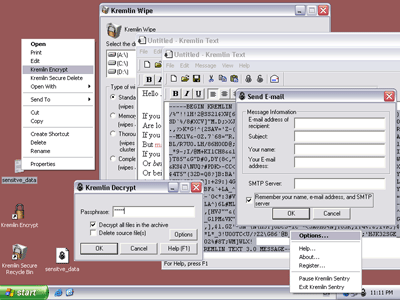
Kremlin 3.0 provides a cross-platform security suite for Mac and PC. It builds a wall around your data, protecting your sensitive information from snooping intruders.
Easily encrypt-decrypt your files in drag-and-drop manner with Kremlin Encrypt and Kremlin Decrypt tools. Encrypted files can be transferred seamlessly between Mac and PC environments. In addition to a portable file format, now licensing and registration is also fully portable across platforms.
You can also schedule the Kremlin to automatically encrypt the files when you log off your computer and decrypt the files when you log back on.
The Kremlin Secure Delete (Recycle Bin) allows you to securely remove files from your computer.
Keep your work\'s privacy with the Kremlin Sentry utility. It wipes all records of your activities from your hard disk and from memory when you log off your computer or your computer becomes idle.
Use Kremlin Text, a secure full-featured text editor, to automatically encrypt your documents, notes and e-mail messages.
Whether you are an individual or running a business, the uniform GUI allows you to use Kremlin 3.0 without worrying about the computer platform. Kremlin 3.0 features seamless support for Windows 98, 2000, XP as well as for Mac OS X, and includes cross-platform, fully portable licensing as well. Cross-platform licensing means that larger enterprises need not separate Mac from PC licenses.
Install the Kremlin 3.0 suite to build the solid and cost-effective security system for protecting your corporate and personal data.
About Kremlin Encrypt
This Encryption Tools program is available in English. It was last updated on 26 April, 2015. Kremlin Encrypt is compatible with the following operating systems: Windows.
The company that develops Kremlin Encrypt is Mercury Development, LLC. The latest version released by its developer is 3.0.
The download we have available for Kremlin Encrypt has a file size of 1.1 MB. Just click the green Download button above to start the downloading process. The program is listed on our website since 2004-04-01 and was downloaded 0 times. We have already checked if the download link is safe, however for your own protection we recommend that you scan the downloaded software with your antivirus. Your antivirus may detect the Kremlin Encrypt as malware if the download link is broken.
How to install Kremlin Encrypt on your Windows device:
- Click on the Download button on our website. This will start the download from the website of the developer.
- Once the Kremlin Encrypt is downloaded click on it to start the setup process (assuming you are on a desktop computer).
- When the installation is finished you should be able to see and run the program.
Program Details
System requirements
Download information
Pricing
Version History
version 3.0
posted on 2004-04-01
Disclaimer
External Download
We do not host Kremlin Encrypt on our servers. We did not scan it for viruses, adware, spyware or other type of malware. This app is hosted by the software publisher and passed their terms and conditions to be listed there. We recommend caution when installing it.
The external download link for Kremlin Encrypt is provided to you by apps112.com without any warranties, representations or guarantees of any kind, so access it at your own risk.
If you have questions regarding this particular app contact the publisher directly. For questions about the functionalities of apps112.com contact us.
